Blooket Dashboard: A Practical Guide to Games, Question Sets, Homework, and Reports
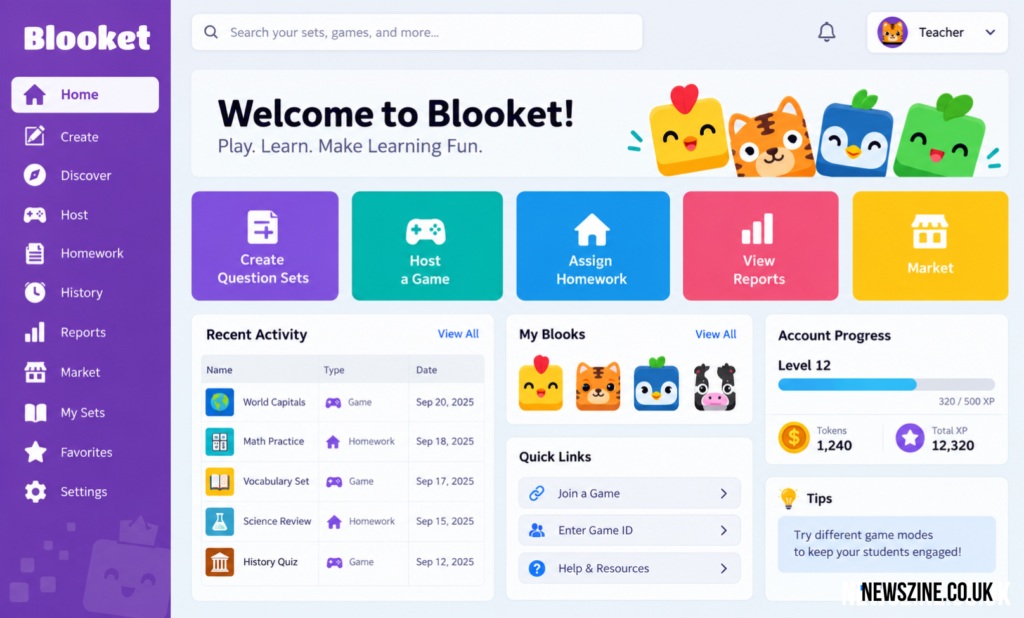
Blooket Dashboard
The Blooket Dashboard is the main workspace users enter when managing activities on Blooket. It brings the platform’s important account tools into one place, allowing educators to prepare learning material, organize question sets, launch activities, assign independent work, and return to earlier sessions. Rather than functioning only as a page for starting games, the dashboard connects several stages of using Blooket.
Its role is especially clear from a teacher’s perspective. A teacher might begin by preparing questions for an upcoming lesson, use those questions in a classroom game, and later examine how the class responded. This creates a simple cycle: prepare the content, run the activity, study the results, and decide what needs further attention. Students use Blooket differently, with greater emphasis on joining activities, completing assignments, earning account rewards, and interacting with collectible Blooks.
What Is the Blooket Dashboard?
The dashboard can be understood as the account management area behind the Blooket learning experience. The games themselves are the part students are most likely to notice, but teachers need tools for organizing everything that happens around those games. Those controls are brought together through the account interface.
For educators, this means a question set does not have to exist as an isolated collection of questions. It can become the basis of a live review session or an independently completed assignment. Once students have participated, information generated by that activity can then help the teacher evaluate what happened. The dashboard therefore links content management with classroom activity and follow-up.
| Area | Main Use |
|---|---|
| Question Sets | Prepare and manage educational questions |
| Discover | Find existing public sets |
| Host | Start teacher-led live activities |
| Homework | Give students activities to complete independently |
| History | Return to earlier sessions |
| Reports | Examine participation and learning results |
| Market | Access Blooks and account-related items |
| Account | Manage personal Blooket activity and settings |
The available options may differ according to the type of account and Blooket’s current feature structure.
How Teachers Use the Dashboard
Teachers are likely to use the dashboard as a working area rather than simply as a game launcher. Preparing a Blooket activity normally begins with educational content. An instructor needs a suitable question set and must decide how that material fits the lesson. The set can then be paired with an appropriate activity.
After students have participated, the same general account area gives the educator a route back to previous activity information. This matters because a classroom game has limited educational value if the teacher never looks beyond the final ranking. Examining which questions caused difficulty can provide more useful information than knowing who finished first.
The dashboard consequently supports both classroom engagement and instructional decision-making. Teachers can use the entertaining side of Blooket to encourage participation while still paying attention to the academic information produced by student answers.
Creating and Managing Question Sets
Questions form the educational foundation of most Blooket activities. Teachers can build sets based on the material they want students to practice. A set might cover multiplication, scientific terminology, historical events, vocabulary, geography, reading comprehension, or another subject appropriate to the class.
Good question design remains important regardless of the game mode used later. A fast-moving activity cannot correct unclear wording, inaccurate answers, or questions that do not match the lesson objective. Teachers should therefore treat question creation as part of lesson planning rather than merely as preparation for a game.
Keeping sets organized can also save time. Material developed for one lesson may remain useful for revision, exam preparation, or another class. Instead of rebuilding the same content repeatedly, teachers can maintain useful sets and adjust them as the curriculum progresses.
Finding Material Through Discover
Creating every set from the beginning is not always necessary. Blooket includes discovery features that can help educators locate material created around particular subjects or topics. This can reduce preparation time when an appropriate set is already available.
However, finding a set does not remove the need to review it. Public educational material can vary in difficulty, wording, scope, and accuracy. A teacher should examine questions before using them with students and make sure they correspond with what the class has actually learned.
Discover is therefore most useful as a starting point. It can provide ideas or ready-made material, but professional judgment is still needed before bringing that material into a lesson.
Hosting a Live Blooket Game
Live hosting is one of the platform’s main classroom uses. Once an educator has selected suitable questions and chosen a game experience, a session can be prepared for students to join. Participants generally use the joining details supplied for that particular activity.
The teacher’s job during a session is not limited to starting it. Classroom circumstances matter as well. The instructor may need to explain the rules, make sure students can connect, monitor participation, and decide how much time should be devoted to the activity.
A Blooket session works best when the game has a clear educational purpose. It might be used to refresh knowledge before a test, check understanding after a lesson, introduce practice questions, or provide a change from conventional review exercises. Choosing the game first and trying to find an academic purpose afterward is usually less effective.
Understanding the Game ID
A game ID acts as an entry point for a particular hosted session. When a teacher launches an eligible live activity, students receive joining information that connects them with that game. This avoids requiring the teacher to manually add each participant individually.
It is useful to distinguish the game ID from a permanent classroom identifier. It belongs to a particular activity rather than serving as a universal code for every future session. Students should therefore use the current joining information supplied by their teacher instead of assuming an older code will continue working.
If joining problems occur, checking the entered ID, current session status, internet connection, and teacher instructions can resolve many basic issues.
The Student Side of Blooket
Students interact with Blooket differently from educators. Their experience is centered on answering questions, participating in games, completing assigned activities, and using account-based features where available. They generally do not need the same planning and reporting controls required by teachers.
A student account can nevertheless make the experience more continuous. Rather than treating every activity as an isolated visit, a logged-in student can interact with progress and reward systems connected with the platform. Features involving experience, tokens, Blooks, and the Market give the account a game-like identity beyond an individual classroom session.
These elements can encourage participation, but they should remain secondary to the learning objective. The rewards may make an activity more appealing, while the questions remain the part directly connected with the subject being studied.
Assigning Blooket as Homework
Not every Blooket activity needs to happen while the entire class is together. Homework gives educators another way to use question sets by allowing students to work through an assigned experience outside a teacher-led live session.
This approach can fit several classroom situations. A teacher might use an assignment for additional practice after a lesson, revision before an assessment, or work that students can complete at different times. It can also provide another opportunity for students who need more exposure to a topic.
The important part comes afterward. Completion alone does not necessarily indicate understanding. Looking at the results can show whether students consistently understood the material or repeatedly encountered difficulty with particular concepts.
Why History Matters
A busy teacher may run many activities during a term. Without a record of earlier sessions, useful information could quickly become difficult to locate. The history area provides a way to return to previous activity records rather than treating each completed game as disposable.
Past sessions can also provide context. Suppose a class struggled with fractions during an earlier review but performed considerably better after additional teaching. Comparing activities can help the teacher see whether the later performance supports that improvement.
History is also useful for routine organization. Instead of relying on memory to remember when an activity was used or which set supported a lesson, teachers have an account record that can assist when reviewing previous work.
Reading Blooket Reports
Reports are where Blooket can move from simple classroom entertainment toward useful assessment support. A final game ranking answers only a narrow question: who performed best within the rules of that particular mode? Teachers usually need different information.
Accuracy, correct and incorrect responses, participation, and question-level performance can provide a clearer picture. If nearly everyone misses the same question, the result deserves attention even if students appeared engaged throughout the game. The issue could be a difficult concept, unclear teaching, or even a poorly written question.
Individual results can reveal another pattern. A class average may look acceptable while one student is struggling across several concepts. Conversely, a low class average might be driven by a few particularly difficult questions rather than weak understanding of the entire topic.
Reports should therefore be interpreted rather than simply collected.
Using Results to Find Learning Gaps
One practical use of performance information is deciding what to teach again. Consider a 20-question activity in which students answer 17 questions accurately but repeatedly miss three dealing with the same concept. Looking only at the overall result could suggest that the class did reasonably well. Looking at the individual questions tells a more useful story.
The teacher can revisit the difficult concept, explain it differently, provide additional examples, and later check understanding again. This is a stronger use of game data than simply recording scores.
The same principle applies to individual students. Patterns across several activities may indicate where a learner needs more practice. Blooket results should not be treated as a complete assessment of a student’s ability, but they can contribute useful evidence alongside classroom work, quizzes, discussions, and formal assessments.
Homework Results and Student Progress
Homework information can help teachers understand how students handled work completed outside a live classroom environment. Depending on the available reporting options, educators may be able to examine participation, accuracy, completion, question performance, and other activity details.
Time information should be interpreted carefully. Spending a long time on an activity does not automatically mean a student struggled, just as finishing quickly does not prove mastery. Interruptions, device conditions, reading speed, and the way a student approaches a game can all affect the result.
A better method is to identify recurring trends in the results. Repeated mistakes on the same subject area are usually more informative than one unusual statistic from a single assignment.
Blooket Plus and Additional Reporting
Blooket provides free functionality, while its paid options can add capabilities intended for users who need more detailed features. Reporting is one area where expanded tools can become relevant, particularly for educators interested in deeper question and participant analysis.
More detailed data is not automatically more useful, however. A teacher running occasional review activities may find basic information sufficient. Someone using Blooket regularly across multiple classes may place greater value on expanded reporting and data-management features.
The decision to use a paid plan should therefore be based on actual classroom needs rather than the assumption that more statistics always improve teaching.
Downloading and Working With Data
For educators with access to suitable reporting features, exporting information can be helpful when activity data needs to be used outside Blooket. A spreadsheet format, for example, allows information to be organized, compared, stored with other class records, or examined in more detail.
Exported data can be especially practical for teachers managing repeated activities across a longer period. Instead of depending entirely on an online report screen, they can incorporate relevant results into their own record-keeping system.
Schools and educators should still follow their normal student-data policies when storing or sharing exported information. Convenience does not remove the need to handle educational records responsibly.
The Market and Blooks
The Market represents the collectible side of the Blooket experience. Blooks are character-style collectibles associated with user accounts, while tokens and other reward mechanics can give students reasons to remain interested in their account beyond a single activity.
From an educational perspective, these systems work primarily as engagement mechanisms. They do not replace the questions or learning material. Their purpose is closer to giving students a sense of progress and collection within the wider game environment.
Teachers may find that some students respond strongly to these rewards while others care more about competition or simply completing the activity. This is one reason Blooket should be treated as one classroom tool rather than a universal solution for student motivation.
Free Access and Account Options
Blooket can be used without requiring every educational feature to sit behind a paid subscription. This makes it possible for teachers to experiment with the platform and determine whether its style fits their classroom before considering additional functionality.
Free and paid tools should not be confused with teacher and student roles. Account type, subscription level, and activity participation can affect what a person sees and what information is available. As Blooket updates its service, specific controls may also move or change.
For this reason, users returning after a long period should pay attention to the current dashboard rather than relying entirely on an older tutorial or screenshot.
Using the Dashboard Effectively
A useful Blooket workflow begins with the lesson rather than the game. Teachers should first identify what students need to practice or demonstrate. They can then select or create questions that measure that knowledge and choose an activity that suits the class.
After the session, results deserve at least a brief review. Questions with unusually poor performance should be checked both for academic difficulty and for possible wording problems. Individual student results should also be considered in context rather than treated as a complete measure of achievement.
Keeping question sets organized and removing outdated material can make future preparation easier. The dashboard becomes more valuable when it functions as an organized teaching workspace rather than a collection of forgotten games and sets.
Common Problems When Using Blooket
Most difficulties are relatively straightforward. Students may enter an incorrect joining code, try to access a session that is no longer active, experience connection problems, or use an account different from the one they normally use. Teachers may also have trouble locating older information if many activities have accumulated.
Another common issue is confusing the different parts of Blooket. Joining a game, managing a personal account, accessing a homework assignment, and reviewing a teacher report are separate actions even though they belong to the same platform.
Understanding this distinction makes navigation easier. Students generally need participation tools, while teachers need the broader workflow of content, hosting, assignments, history, and analysis.
Privacy and Responsible Classroom Use
Any educational platform involving student participation should be used with appropriate attention to privacy and school policy. Teachers should follow their institution’s requirements concerning student accounts, names, classroom technology, and educational data.
Game results should also be interpreted responsibly. A poor performance during one Blooket session can be influenced by misunderstanding, speed, distraction, unfamiliarity with the game mode, or other circumstances. It should not automatically become a judgment about a student’s overall ability.
Blooket is most useful when its information supports teacher judgment rather than replacing it.
Final Thoughts
The Blooket Dashboard connects the administrative and educational sides of the platform. Teachers can manage question-based activities, run live sessions, provide independent work, revisit earlier games, and examine student responses. Students encounter a more participation-focused experience built around questions, games, assignments, progress, and collectibles.
Its strongest classroom value does not come simply from making quizzes look like games. The more useful feature is the connection between an activity and what happens afterward. When teachers review missed questions, identify patterns, adjust instruction, and use the results to plan the next lesson, Blooket becomes more than a temporary classroom diversion.
Used with clear learning goals and well-designed questions, the dashboard provides a practical way to manage game-based review while keeping student understanding at the center of the activity.