
SFM Compile: Understanding the Compilation and Export Process in Source Filmmaker
SFM Compile
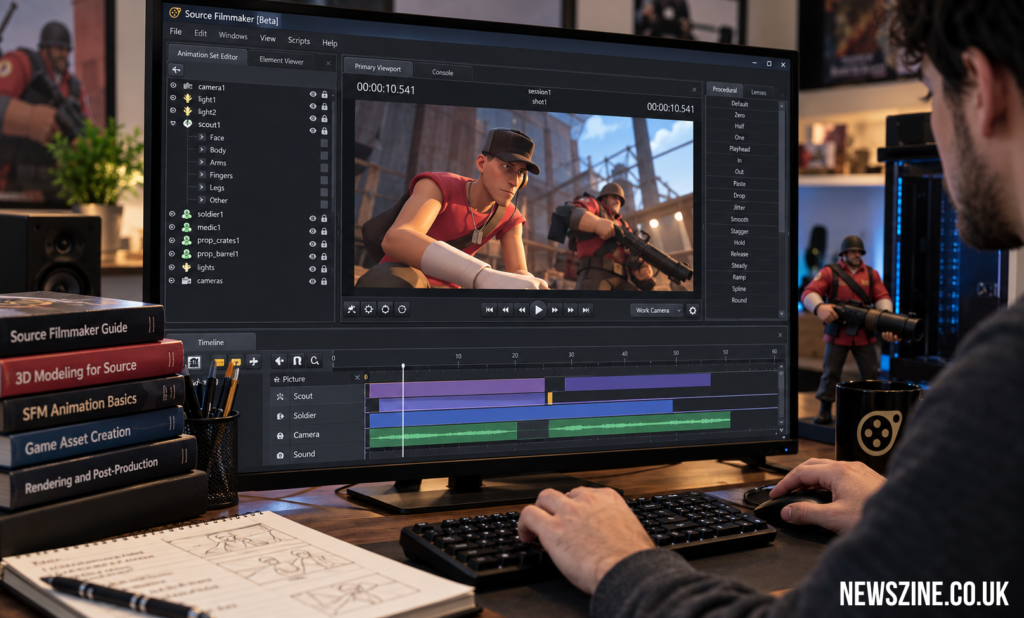
SFM Compile is a term commonly associated with the technical steps involved in preparing models, assets, animations, and finished scenes for use with Source Filmmaker. Source Filmmaker, usually shortened to SFM, gives creators a workspace where they can arrange characters, control cameras, build lighting, animate movement, and produce videos using assets based on Valve’s Source technology. While creating an animation may appear to be mainly a visual process, several technical operations happen behind the scenes before an asset or finished project can be used correctly.
The word “compile” can have different meanings depending on what part of the SFM workflow is being discussed. A model creator may use compilation to describe converting model source files into files that the Source engine can recognize. An animator, meanwhile, may be thinking about preparing and rendering a completed sequence. Understanding this distinction is useful because model compilation and final video rendering are related to production, but they are not exactly the same operation.
What Does SFM Compile Mean?
SFM Compile generally describes the process of converting source material into a form that Source Filmmaker or the underlying Source tools can properly use. When creators develop custom models, for example, the original files produced in a 3D modeling program cannot necessarily be placed directly into an SFM scene. The information needs to follow the structure and formats expected by the Source environment.
Compilation acts as a technical bridge between creation and practical use. A creator might build a character in modeling software, prepare its skeleton, create textures, and define animations. Those components then need to be organized correctly before the finished model behaves as expected inside SFM. Because of this, compilation is better understood as part of an asset-production pipeline rather than simply a button that turns an entire SFM project into a movie.
Source Filmmaker and the Role of Compilation
Source Filmmaker combines filmmaking techniques with a real-time game-engine environment. Instead of creating every object from nothing, users can work with characters, maps, props, particles, sounds, and other resources designed for the Source ecosystem. The software provides tools for positioning these elements and turning them into animated sequences.
Compilation becomes especially relevant when a project goes beyond existing assets. If an animator wants to introduce an original character, modified prop, or another custom model, the asset must be prepared in a way SFM understands. Correct compilation allows the software to identify the model’s geometry, materials, skeleton, animations, and related information. An error at this stage can therefore become visible later as a missing texture, incorrect movement, broken model, or asset that does not load at all.
How the SFM Compile Process Works
A typical model compilation workflow starts outside Source Filmmaker. The creator first produces or edits the required asset using suitable modeling and texturing applications. Geometry has to be prepared carefully, while characters that need movement normally require a skeleton and proper rigging. Materials and textures also need to be organized according to the requirements of the Source pipeline.
The creator then prepares the files and configuration information needed by the compilation tools. These instructions tell the compiler how different parts of the asset should be handled. Once the process runs successfully, the resulting files can be placed in the appropriate directories and tested inside Source Filmmaker. Testing matters because a technically successful compile does not automatically mean that every visual or animation detail is correct.
Preparing a Model Before Compilation
Good preparation can prevent many problems later in the workflow. Before attempting an SFM compile, creators should inspect the model itself. Geometry problems, incorrect bone assignments, unsuitable naming conventions, or missing material references can produce unexpected results. Fixing these issues before compilation is usually easier than trying to diagnose them after the asset has been imported.
Organization is equally important. Keeping model source files, textures, animation resources, and configuration files in clearly defined folders makes troubleshooting much easier. When projects contain many custom assets, careless file management can lead to duplicate resources or references pointing toward the wrong location. A structured project therefore reduces unnecessary technical work.
Understanding Model Source Files
An SFM-compatible model is rarely represented by a single piece of information during development. Its visual shape, skeleton, animations, materials, and behavioral instructions may originate from different files. Compilation brings the necessary information together and produces the files expected by the engine.
One important part of this workflow is the configuration used to describe how the model should be built. Depending on the asset and tools involved, creators may define model names, body components, animation sequences, surface information, material paths, and other properties. A mistake in these instructions can affect the final result even when the original 3D model itself is perfectly usable.
Compiling Custom Models for SFM
Custom model compilation is particularly useful for creators who want their projects to look different from scenes made entirely with existing game assets. Original characters, redesigned objects, custom environments, and modified models can all expand what an animator can produce.
After the model has been prepared and exported into suitable source files, the compilation stage converts those resources into the appropriate Source model format. The creator can then place the resulting files in the correct content structure and open SFM to test them. If the model loads but something appears wrong, the creator may need to return to the source files, correct the problem, and compile the model again.
Testing a Compiled Asset
Testing should be treated as part of the compilation process rather than an optional final check. A model can appear normal while standing still but develop problems once animation begins. Bones might deform the mesh incorrectly, materials might fail under certain lighting, or an animation sequence may not behave as planned.
Opening the asset in SFM and checking it under realistic project conditions provides a clearer picture. Creators can examine movement, textures, lighting response, scale, and interaction with the scene. Testing early also prevents a faulty asset from becoming deeply integrated into a large animation, where replacing or repairing it could take considerably more time.
SFM Compile and Animation
Animation itself introduces another layer to the production process. Source Filmmaker allows creators to manipulate characters through controls, poses, keyframes, motion editing, and other animation techniques. Custom assets must be prepared correctly if these controls are expected to work reliably.
A character with poorly configured bones may compile without producing an obvious technical error, yet still be difficult to animate. This demonstrates why successful compilation is not simply about getting the software to accept a file. The finished asset should also serve its intended purpose. For animation projects, that means the rig, model structure, and movement capabilities need to work together effectively.
SFM Compile and Final Rendering Are Different
One common source of confusion is the relationship between compilation and rendering. The two terms describe separate parts of the process and should be understood differently. Compilation generally concerns preparing assets or converting source information into a form the Source environment can use. Rendering concerns producing visual frames from an assembled and animated scene.
Once a project has its models, cameras, lights, animation, and other elements in place, SFM can calculate the visual output. The resulting frames or video can then become part of a larger editing workflow. In other words, compilation helps prepare some of the building blocks, while rendering produces the visible result of the completed scene.
Building a Scene After Assets Are Ready
Once the required assets are functioning, the creative side of Source Filmmaker becomes more prominent. Characters can be positioned within a map, props can be arranged, cameras can be created, and lighting can be adjusted according to the scene. Animation then determines how characters and objects move over time.
This stage shows why technical preparation matters. A well-prepared asset lets the animator concentrate on composition, movement, timing, and storytelling rather than repeatedly stopping to solve file problems. Compilation may happen earlier in the production chain, but its quality can affect almost every later stage of a custom SFM project.
Rendering the Finished SFM Project
Rendering converts the completed scene into visual output. During this stage, the software processes the camera view, models, materials, lighting, shadows, particles, and animation for the required frames. More complicated scenes generally demand more processing than simple ones.
Creators also need to think about the intended destination of the finished work. A short online animation may have different output requirements from a sequence that will receive extensive post-production. Some creators prefer working with image sequences because individual frames provide additional flexibility during editing, while others may choose output methods that better fit a quicker workflow.
Why Compilation Matters in SFM Projects
Compilation matters because Source Filmmaker depends on assets that conform to the technical expectations of its underlying technology. A custom model may look correct inside the program where it was originally created, but that does not guarantee that SFM will interpret it properly. The compilation workflow translates the asset into the structure required by the target environment.
It also gives creators greater control over their projects. Instead of being limited to models that are already available, experienced users can prepare their own assets or adapt suitable resources for a particular production. This can be useful for original animations, machinima, fan projects, educational experiments, and portfolio work.
Common Problems During SFM Compilation
Compilation problems can appear for many reasons. Incorrect file paths are among the most basic issues because the compiler or SFM may be unable to locate a required resource. Material references can also create trouble, particularly when textures have been placed in unexpected folders or configuration information points toward the wrong directory.
Models can have their own technical problems as well. Skeleton errors may affect animation, while geometry issues can change how a mesh appears after compilation. Instead of repeatedly running the same process after an error, it is usually better to read the available error information and inspect the related source files. A systematic approach tends to reveal problems faster than changing several settings at once.
Missing Textures and Material Errors
A familiar problem for SFM users is a model that loads but does not display its intended textures. This usually means the model exists and can be recognized, but something in the material setup is incomplete or incorrectly referenced.
Creators should inspect the material names, folder structure, and paths used by the asset. They should also confirm that all required resources are present in the expected locations. This is another reason organized project folders are valuable. When assets are scattered across unrelated directories, even a minor reference problem can become difficult to identify.
Improving an SFM Compile Workflow
A reliable workflow is usually built through repetition and careful organization rather than constant changes in tools. Creators can keep original files separate from compiled output, use consistent names, maintain backups, and test significant changes before moving deeper into production. These habits make it easier to identify what changed when a new error appears.
It can also help to compile and test smaller parts of a project instead of waiting until a large collection of custom assets is finished. If one model fails, the creator then knows where to focus. When dozens of new resources are introduced simultaneously, identifying the source of a problem becomes much more complicated.
Uses of SFM Compilation
Model compilation supports many types of Source Filmmaker projects. Animators can use it to introduce custom characters into short films, comedy videos, action sequences, or experimental animations. Artists can prepare props for specific scenes, while creators working with game-related content may use custom assets to reproduce or modify environments and characters.
The same knowledge can also be valuable as a technical learning exercise. Working through an asset pipeline teaches creators how modeling, rigging, materials, file structures, animation, and engine requirements connect. Even when someone primarily wants to animate, understanding these technical relationships can make troubleshooting far less confusing.
Learning Through the SFM Community
Source Filmmaker has been used by creators for years, which means a substantial amount of community knowledge has developed around modeling, animation, asset conversion, and troubleshooting. Forums, creator discussions, tutorials, documentation, and shared workflows can be particularly useful when a compiler returns an unfamiliar error.
However, creators should pay attention to the age and context of instructions they find. Different Source-based workflows may use different tools or directory structures, and advice written for one game or configuration may not apply perfectly to another. Understanding why a particular step is required is more useful than copying instructions without knowing what they change.
What People May Mean by SFM Compile Club
The phrase “SFM Compile Club” may appear in searches or community discussions, but it should not automatically be interpreted as an official feature built into Source Filmmaker. In some contexts, such wording may refer informally to groups, websites, communities, or resources focused on SFM compilation and related topics.
Users encountering a community under this name should evaluate it like any other third-party resource. Look at the quality of its instructions, whether information is current, and whether downloads come from sources you trust. Community help can be useful, but it remains separate from the core functions of Source Filmmaker itself.
Understanding SFM Compilation as a Complete Pipeline
The broader idea of SFM compilation becomes easier to understand when viewed as a pipeline. A creator begins with source material, prepares it according to technical requirements, converts it into compatible resources, checks the result, and then uses those resources inside a larger animation project.
Each stage depends on the previous one. A poorly prepared model can create compilation problems, while an incorrectly configured compiled asset can create difficulties during animation. Treating the workflow as connected stages makes troubleshooting more logical because creators can trace a problem back to the point where it was introduced.
Final Thoughts
SFM Compile is best understood as part of the technical workflow surrounding Source Filmmaker rather than as one universal operation that handles every aspect of a project. For custom assets, compilation converts prepared source information into formats that the Source environment can recognize. Rendering takes place later, when an assembled and animated scene is turned into visual output.
Learning the difference between model preparation, compilation, scene creation, animation, and rendering makes Source Filmmaker easier to manage. Creators who organize their files carefully, test assets after important changes, and solve errors methodically can build a more dependable production process. Once these technical stages become familiar, more attention can be given to the part that viewers ultimately see: the finished animation.